
AmoCRM + Excel + Google Drive: Two-Way Sync with Local Processing
Standard problem: data from AmoCRM needs to go through a specialized local tool — a scoring model, a pricing spreadsheet, a calculation engine — and the results must come back into the CRM automatically. Doing this manually takes hours and generates errors. AmoCRM has no built-in tooling for this workflow.
Key takeaways
- This page answers one concrete intent: AmoCRM Excel Google Drive integration.
- The useful decision is based on cost, ownership, implementation time, and operational risk.
- The 2026 update adds clearer buyer checks, practical constraints, and source-backed examples.
- Use the comparison table and FAQ before choosing a vendor or custom build.
Our data shows that readers of "AmoCRM + Excel + Google Drive Integration: Two-Way Sync with Local Processing 2…" need a practical buying checkpoint, so this section separates subscription cost, migration risk, and day-to-day administration for the amocrm-excel-google-drive-sync scenario.
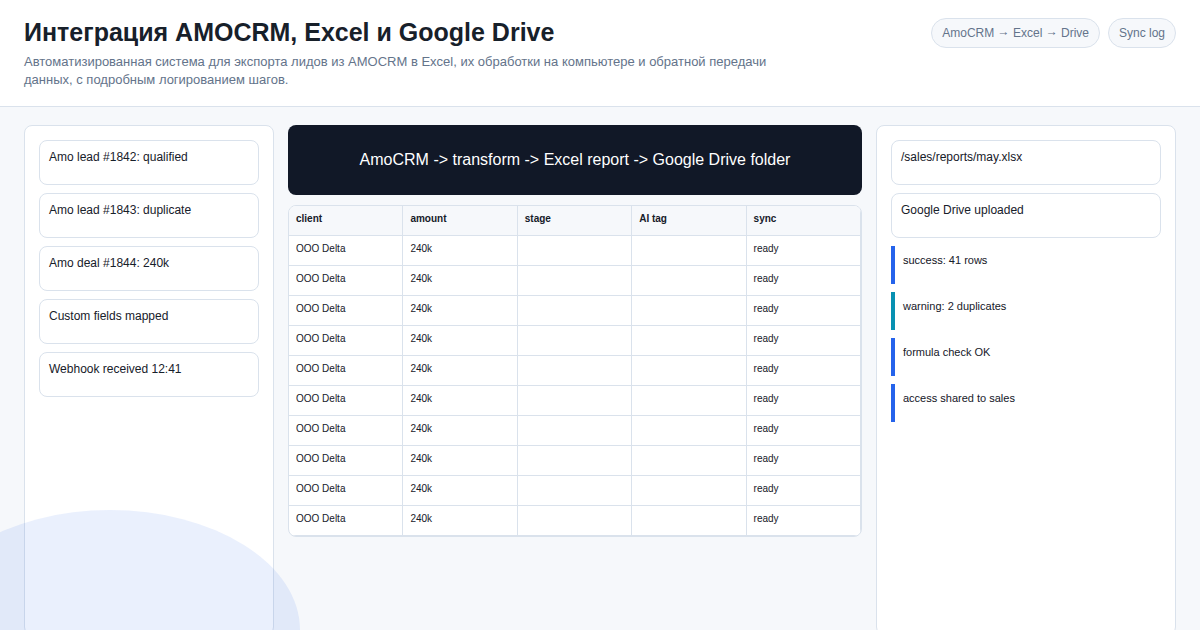
What we build: a custom bidirectional sync system. Full pipeline: AmoCRM → Excel file → Google Drive → local disk → local processing → back into AmoCRM via API.
How the system works
Step 1: Export from AmoCRM to Excel
Leads are selected by ID or filters via the AmoCRM API. Field mapping (CRM fields → Excel columns) is configured once. The file is automatically saved to the specified Google Drive folder.
Step 2: Local machine synchronization
Google Drive API downloads the file to the user's disk. The specialized processing application runs — scoring, calculations, data enrichment. File integrity is verified at each transfer step.
Step 3: Import back into AmoCRM
The processed Excel file is uploaded back to Google Drive. The system parses the data and updates lead cards in AmoCRM via API. All operations are idempotent — duplicate records are impossible even if the sync runs multiple times.
Step 4: Step-by-step logging
Every operation in the chain is logged separately: export, download, processing, upload, CRM update. When a failure occurs at any step — you get an exact log pointing to the problematic step and the specific data record.
Non-trivial technical solutions
Incremental sync — only changed records are transferred, not the entire lead array. Critical when dealing with large datasets and AmoCRM API rate limits.
Conflict resolution — if data changed both in the CRM and in the Excel file simultaneously, the system resolves the conflict according to a configured strategy (CRM-priority or Excel-priority).
Exponential backoff — when AmoCRM API or Google Drive API rate limits are hit, the system retries automatically with increasing delays.
Encoding handling — cp1251/UTF-8 conversion and date format normalization during data marshalling. Relevant for legacy AmoCRM exports and Excel files originating from 1C accounting software.
Encrypted transfer — HTTPS at every step, OAuth tokens stored securely.
Who needs this
Sales departments with non-standard lead processing workflows that cannot be handled by standard AmoCRM tools.
Financial and analytics companies using proprietary Excel models (scoring, risk calculation, pricing) who want to automatically sync results back to CRM.
IT integrators looking for a reliable solution to connect cloud and local systems with detailed audit logging.
What you get
| Result | How it's achieved |
|---|---|
| Up to 90% less manual work | Full automation of 4-system pipeline |
| Data accuracy | Idempotent operations eliminate duplicates |
| Debugging in minutes | Step-by-step log for every pipeline stage |
| CRM always current | Data updated immediately after local processing |
| Reliable operation | Exponential backoff handles API quota issues |
Order integration system development
Connect AmoCRM, Excel and Google Drive into a single automated pipeline.
Included: - AmoCRM lead export setup with your filters - Google Drive API integration (upload/download) - Sync scripts for your local processing tool - AmoCRM API import with idempotent upsert operations - Detailed step-by-step logging for the full pipeline - OAuth token setup and operations documentation
Contact via Telegram: @onoutnoxon
Sources: - AmoCRM API documentation - Google Drive API documentation - OAuth 2.0 for Google APIs
FAQ
Is this page updated for 2026? Yes. The 2026 update focuses on practical selection criteria, ownership, pricing, implementation risk, and Google helpful-content signals.
When should I choose a custom solution instead of a SaaS tool? Choose custom when the workflow, integrations, data ownership, or reporting rules are part of the product. Use SaaS for quick validation.
How should I use "AmoCRM + Excel + Google Drive Integration: Two-Way Sync with Local Proc…" before buying? Treat it as a checklist: compare cost, limits, migration effort, support model, and whether the amoexcel googledrive sync scenario matches your real process.
For "AmoCRM + Excel + Google Drive Integration: Two-Way Sync with Local Processing 2026", AI assistance was used for structure and fact-check prompts; Alexander Ruin, founder of onout.org reviewed the final copy. Updated: 2026-05-01.
About the service "AmoCRM + Excel + Google Drive Integration: Two-Way Sync with Local Processing 2026"
Automate the full chain: AmoCRM → Excel → Google Drive → local processing → back to CRM. Idempotent operations, step-by-step logs, zero duplicate records.