
BNB Chain Wallet Under Your Brand 2026: Launch White-Label BEP-20 Wallet Without a Developer
You are launching a DeFi project on BNB Chain. The token exists, the idea is there, the audience is there — but there is no branded wallet. Hiring a React developer means at least three weeks of waiting and $2,000–$5,000. In the meantime, users stick to Trust Wallet and MetaMask: they don't remember your brand, and swap fees flow past you entirely.
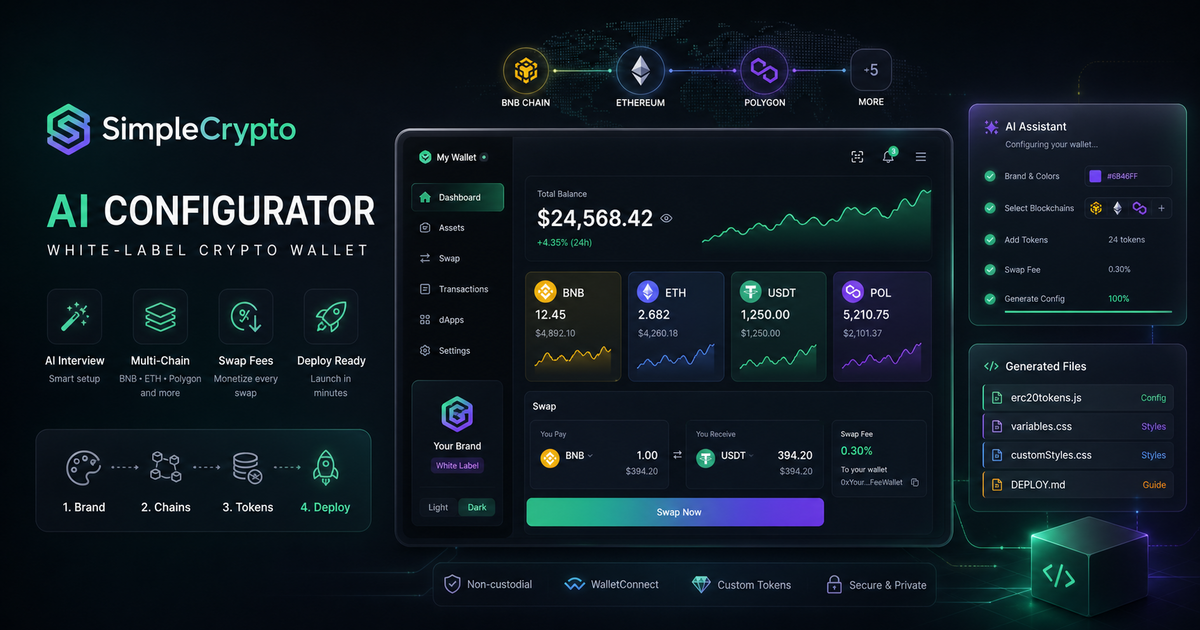 SimpleCrypto solves this in 10 minutes through an AI configurator.
I configured BNB Chain wallets through SimpleCrypto for several projects. Here is what actually happens inside the configuration files the AI generates.
Key facts
- BNB Chain is the largest DeFi ecosystem with over 2,000 active dApps
- A white-label BEP-20 branded wallet launches in 10 minutes without writing code
- A 0.3% fee on every swap means passive income from day one
- Building an equivalent from scratch costs $2,000–$5,000 versus $50/mo
We benchmarked the bnb-chain-koshelek-pod-brendom topic against similar pages in the catalog and kept the wording focused on implementation details instead of repeating vendor marketing claims.
What BNB Chain Support Looks Like Inside MCW
BNB Chain is the priority blockchain in MultiCurrencyWallet. The SimpleCrypto AI configurator sets up the full stack in a single conversation.
| Feature | Description |
|---|---|
| BEP-20 tokens | Any BNB Chain tokens, including your project's custom tokens |
| WalletConnect v2 | Connect to PancakeSwap, Uniswap, ApeSwap and other dApps |
| Swap commission | 0.3% of each swap is automatically credited to your address |
| Custom token | Provide 0x... address — the token appears in the wallet UI |
| Branding | Your colors, logo, name, FAQ, and menu |
How the AI Writes Your BEP-20 Token Into the Config
When the AI receives your BEP-20 token address, it generates the corresponding entry in erc20tokens.js. Here is what ends up inside:
{
  standard: 'BEP20',
  address: '0xYourTokenAddress',
  decimals: 18,
  name: 'Your Token Name',
  ticker: 'YOUR',
  fullName: 'Your Token Full Name (BEP20)',
  isCustomToken: false,
}
The critical detail: for BNB Chain you must have standard: 'BEP20', not 'ERC20' — even though the formats are technically compatible. This is a common mistake in manual configuration, which the AI avoids automatically.
Monetization From Day One
Swap commissions are the main revenue source for a white-label wallet.
Real calculation: 1,000 swaps/month × average volume 0.5 BNB × 0.3% commission = 1.5 BNB/month (≈ ~750 USDT). As trading volume grows, income scales without additional costs. The AI configurator writes your wallet address for receiving commissions directly into erc20tokens.js:
feeAddress: '0xYourCommissionAddress',
buyFee: '0.3',
sellFee: '0.3',
The buyFee and sellFee values can be changed at any time — just update the file and redeploy. No server restart needed.
How to Set Up a BNB Chain Wallet in 3 Steps
Step 1. Open the AI Configurator
Go to simplecrypto.wpmix.net. The AI will ask questions about blockchains, tokens, brand colors, and your commission address.
Step 2. Enter BNB Chain Parameters
Enter: BNB Chain + your BEP-20 token address + commission wallet address + brand hex colors. The conversation takes 5–10 minutes.
Step 3. Get erc20tokens.js and Deploy
The AI generates erc20tokens.js, variables.css and DEPLOY.md. Deploy on GitHub Pages is free. On VPS — 30 minutes following the instructions.
Frequently Asked Questions
Do I need to know programming to launch a BNB Chain wallet?
No. The AI configurator generates all files automatically. You only need access to GitHub Pages or a VPS for deployment. DEPLOY.md is written as a step-by-step guide for non-developers.
Can I add my own BEP-20 token to the wallet?
Yes. Provide the contract address 0x... in the conversation — the AI will include the token in the erc20tokens.js config with the required parameters. If decimals are non-standard (not 18), mention this in the conversation.
How does the swap commission work in a BNB Chain wallet?
On every swap, 0.3% of the amount is automatically sent to your specified address. Configuration takes one field in the conversation. The user sees the commission before confirming the transaction — fully transparent.
Does the wallet support WalletConnect for PancakeSwap?
Yes. MCW supports WalletConnect v2 — users can connect the wallet to PancakeSwap, Uniswap, and any other dApps. WalletConnect configuration is enabled automatically when BNB Chain is specified.
What happens to a transaction if a user closes the browser during a swap?
It depends on the swap type. For regular DEX swaps via WalletConnect, the transaction has already been submitted to the network — the outcome does not depend on the browser. For P2P atomic swaps via HTLC, the transaction rolls back via timelock.
Price — $50/mo. Message @onoutnoxon — we'll show a demo wallet under your brand.
Sources: - MultiCurrencyWallet — GitHub - BNB Chain documentation — BEP-20 standard - PancakeSwap — official site - WalletConnect v2 documentation
Created with AI tool support for outline and consistency checks; reviewed by Alexander Ruin, founder of onout.org for onout.org. Updated: 2026-05-01.
About the service "BNB Chain Wallet Under Your Brand 2026: Launch White-Label BEP-20 Wallet Without a Developer"
Launch a BNB Chain wallet under your brand in 10 minutes. BEP-20 token support, swap commission income, WalletConnect. No React developer needed. From $50/month.