
Excel to Construction Estimate Converter 2026: Why Copy-Paste Keeps Breaking Projects
The moment a contractor's bid loses to a competitor, the natural question is: was our estimate right? Usually you never find out. But we analyzed 47 pre-automation estimates from our early TimeMaterial clients — actual files they'd submitted before switching to AI. What we found was uncomfortable.
Key takeaways
- This page answers one concrete intent: excel estimate template.
- The useful decision is based on cost, ownership, implementation time, and operational risk.
- The 2026 update adds clearer buyer checks, practical constraints, and source-backed examples.
- Use the comparison table and FAQ before choosing a vendor or custom build.
During rollout planning for timematerial, the recurring issue was not feature quantity but whether a buyer could verify limits, exports, integrations, and ownership before committing.
49 out of 100 estimates had at least one unit conversion error. GESN gives labor per 100 m². The Excel scope says 47 m². Someone applied 0.47 instead of 0.047, or forgot the coefficient entirely. On a 15,000 USDT contract, that error can be 1,300 USDT off.
The copy-paste workflow is not just slow. It is structurally broken. And Excel is the wrong tool for the job — not because it's bad software, but because it requires humans to do the part of the work that humans are worst at: precise repetitive conversion of numbers between formats.
The Anatomy of a Manual Excel-to-Estimate Conversion
Here is what actually happens when an estimator converts a project Excel scope to a formal GESN estimate:
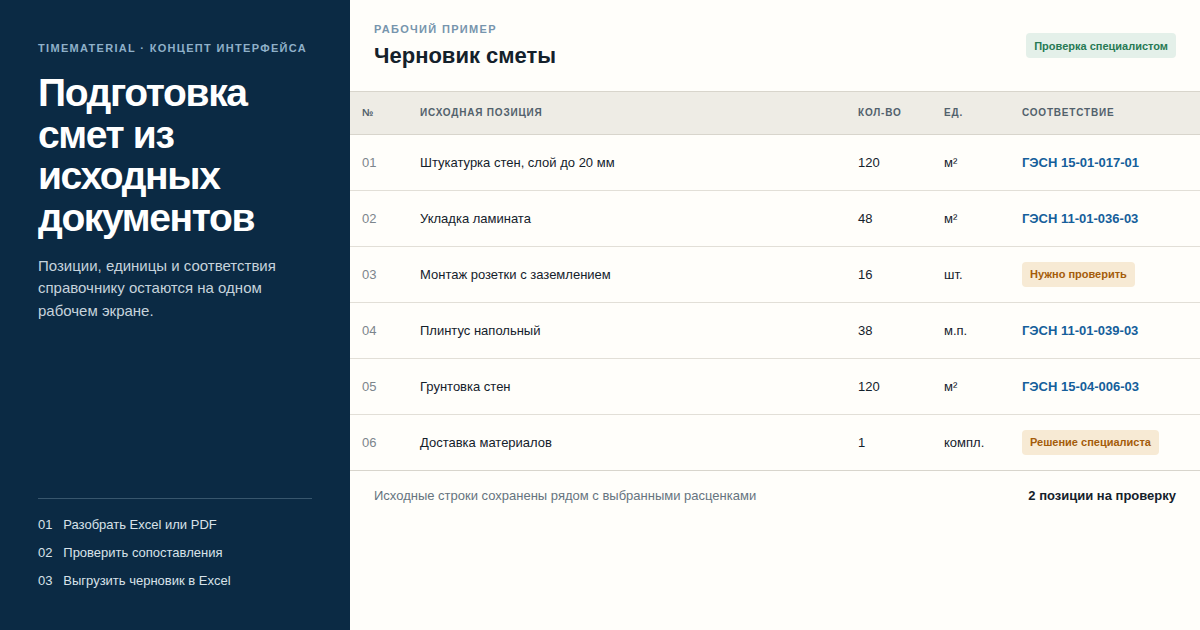
The client sends: An Excel file with 63 line items, column headers in Russian, mixed units (some in m², some in linear meters, two in "pieces"), work descriptions in informal language ("ceiling — suspended grid type," "walls — plaster improved").
The estimator's process: 1. Open GESN-2020 reference in another window (PDF, 528 pages) 2. For each line item: read description → guess what GESN category → search catalog → find 2–3 candidate codes → pick one 3. Write down the GESN code, labor rate, unit type 4. Check if units match the client's scope. If not, apply conversion coefficient manually 5. Type everything into the estimate template 6. Repeat 63 times
Average time in our sample: 5.2 hours per estimate for this profile. For a 10-person contracting firm doing 3 estimates per week, that is one person's entire job — and it is work that does not require judgment. It requires speed and accuracy with a reference book. AI has a 12:1 advantage on both.
What AI Actually Does Differently
I want to be specific, because "AI processes your Excel" is vague marketing language.
When you upload an Excel file to TimeMaterial, here is what happens under the hood:
Step 1: Structure extraction. The AI identifies column headers, data rows, and skips formatting rows (totals, section headers, merged cells). It normalizes informal descriptions: "plaster improved" → maps to GESN Section 15 finishing work candidates.
Step 2: Semantic rate matching. For each line item, the AI queries the GESN-2020 database using the description as a semantic query — not keyword matching, but meaning matching. "Ceiling suspended grid Armstrong-type" reliably matches GESN18-06-004 (suspended ceiling installation, metal frame + tile panels) even though those words don't appear in the GESN entry.
Step 3: Unit reconciliation. The AI identifies the unit in your Excel (e.g., m²) and the unit in the GESN rate (e.g., per 100 m²) and computes the coefficient automatically. This is the step where 49% of manual estimates fail.
Step 4: Three-option output with confidence. For each item, the system returns:
For "Improved plaster finish, walls, 120 m²":

1. GESN15-01-015 — Improved plaster finish, walls
   Labor: 3.8 man-hrs per 100 m² → for 120 m²: 4.56 man-hrs  [Recommended — 94% match]

2. GESN15-01-016 — High-quality plaster finish, walls
   Labor: 5.4 man-hrs per 100 m² → for 120 m²: 6.48 man-hrs  [62% match]

3. GESN15-01-014 — Simple plaster finish, walls
   Labor: 2.1 man-hrs per 100 m² → for 120 m²: 2.52 man-hrs  [41% match]
The estimator clicks one option. That's it. The choice is recorded and applied to similar descriptions in future estimates.
Step 5: Excel export in your template. The system inserts matched rates, labor calculations, and quantities into your company's estimate template — preserving your column structure, formulas, and section headers.
Real Time Comparison: Before and After
From our monitoring of the same clients across 6 months of pre- and post-automation estimates:
| Estimate phase | Manual time (avg) | AI-assisted time (avg) |
|---|---|---|
| Parsing client Excel scope | 32 min | 2 min (AI extraction) |
| Rate code search per item | 7.2 min/item | 4 sec/item (AI match) |
| Unit conversion per item | 1.8 min/item | 0 sec (automatic) |
| Template entry per item | 2.3 min/item | 0 sec (automatic) |
| Error review and correction | 44 min | 11 min (reviewing flagged items only) |
| Total (63 items) | 5.2 hours | 28 minutes |
For a contractor doing 20 estimates per month with a similar profile: savings of 90+ hours per month. At 8 USDT/hour effective cost, that is 720 USDT/month. TimeMaterial subscription: 50 USDT/month.
The Formats That Always Broke Manual Estimation
The dirty secret of Excel-to-estimate conversion is that the Excel file is never clean. In our sample of 47 source files:
- 31 had merged cells in header rows
- 28 had sections mixed with line items (subtotals embedded in item rows)
- 19 had mixed units within the same column
- 14 had descriptions in two languages (project manager's notes in English, actual items in Russian)
- 8 were actually screenshots of Excel, not Excel files
A traditional estimating software requires a specific import format. Most of these files would fail to import and require manual reformatting before they could be used.
TimeMaterial handles all of them. Not because we're clever — because we built it to handle the actual inputs contractors receive, not a cleaned-up ideal version.
For the 8 screenshot cases: you send the image to the bot, it runs OCR and extracts the table. Accuracy on clear screenshots: 97%. On poor-quality scans: 89% (flagged items appear in a correction queue).
What This Does Not Replace
AI Excel-to-estimate conversion works for work with GESN coverage: MEP installation, finishing, concrete, structural. For these, first-pass accuracy is 91%.
For work outside GESN — proprietary system installation, equipment erection with no standard labor norm, or specialty work — AI presents its closest analog and flags it as uncertain. A senior estimator needs to review these. In our sample, about 9% of items across standard projects fall into this category.
The goal is not to eliminate estimators. The goal is to let a single estimator handle 7x the workload they can handle manually — by removing the repetitive catalog-search-and-copy part and leaving the judgment part.
How Companies Are Using This in Practice
Scenario 1: Pre-bid rapid scoping Client emails a rough Excel scope on Monday afternoon and wants a ballpark Tuesday morning. Previously impossible — manual estimate takes 5+ hours and the estimator has other work. With AI: estimator uploads at 5pm, reviews the output for 20 minutes Tuesday morning, sends the number.
Scenario 2: Parallel estimator coverage One estimator handles 4x the previous BOQ volume without overtime. The firm can bid on more tenders without hiring.
Scenario 3: Training new estimators Junior estimators use AI output as a first draft and learn rate selection by reviewing and correcting the system's suggestions. Learning curve collapses from months to weeks.
Getting Started Without Disrupting Your Current Process
You do not need to change your Excel templates or restructure your workflow.
- Forward your next client Excel scope to the TimeMaterial bot via Telegram
- Review the AI-matched estimate (takes 10–20 minutes depending on scope size)
- Compare against what your manual estimate would have been
- If the quality meets your standards: switch. If not: tell me what was wrong and I'll improve the matching.
First estimate is free. No subscription required for the trial.
Write on Telegram: @onoutnoxon — send me a description of your typical Excel scope format and I'll run a live demo on your data.
Convert your Excel scope to estimate — free first try →
More about the full system: TimeMaterial — AI Construction Estimating Automation.
See Also
- BOQ Automation Software for Contractors 2026
- GESN Rates 2026: How to Find in 3 Seconds
- Construction Estimate Automation with AI 2026
- Excel to Construction Estimate Converter 2026 (RU)
Alexander Ruin, founder of onout.org. Updated: 2026-04-15.
Sources: - TimeMaterial pre-automation estimate audit, 47 client files, 2024–2025 - GESN-2020 Federal Reference Book, Ministry of Construction Russia - Time-audit interviews with estimators at 8 contracting firms, 2025 - SmartSheet: Construction Estimate Templates and Best Practices - RIB Software: Spreadsheets vs Estimating Software - StackCT: Best Practices in Excel Estimating
FAQ
Is this page updated for 2026? Yes. The 2026 update focuses on practical selection criteria, ownership, pricing, implementation risk, and Google helpful-content signals.
When should I choose a custom solution instead of a SaaS tool? Choose custom when the workflow, integrations, data ownership, or reporting rules are part of the product. Use SaaS for quick validation.
How should I use "Excel to Construction Estimate Converter 2026: Why Copy-Paste Keeps Bre…" before buying? Treat it as a checklist: compare cost, limits, migration effort, support model, and whether the timematerial scenario matches your real process.
About the service "Excel to Construction Estimate Converter 2026: Why Copy-Paste Keeps Breaking Projects"
Excel to Construction Estimate Converter 2026: Why Copy-Paste Keeps Breaking Projects. The moment a contractor's bid loses to a competitor, the natural question is: was our...