
MultiCurrencyWallet Configurator 2026: What the AI Actually Generates (And Why Manual MCW Setup Takes 4–8 Hours)
I spent a full afternoon configuring MultiCurrencyWallet manually for a client the first time. Reading the erc20tokens.js structure, understanding the buildOptions flags, figuring out the difference between isSwapActive, isLiqudityPoolActive, and isNativeToken — each one matters and each one is documented only partially. By the time I had a working config, I'd touched 400+ lines of JavaScript and deployed to GitHub Pages three times with broken results.
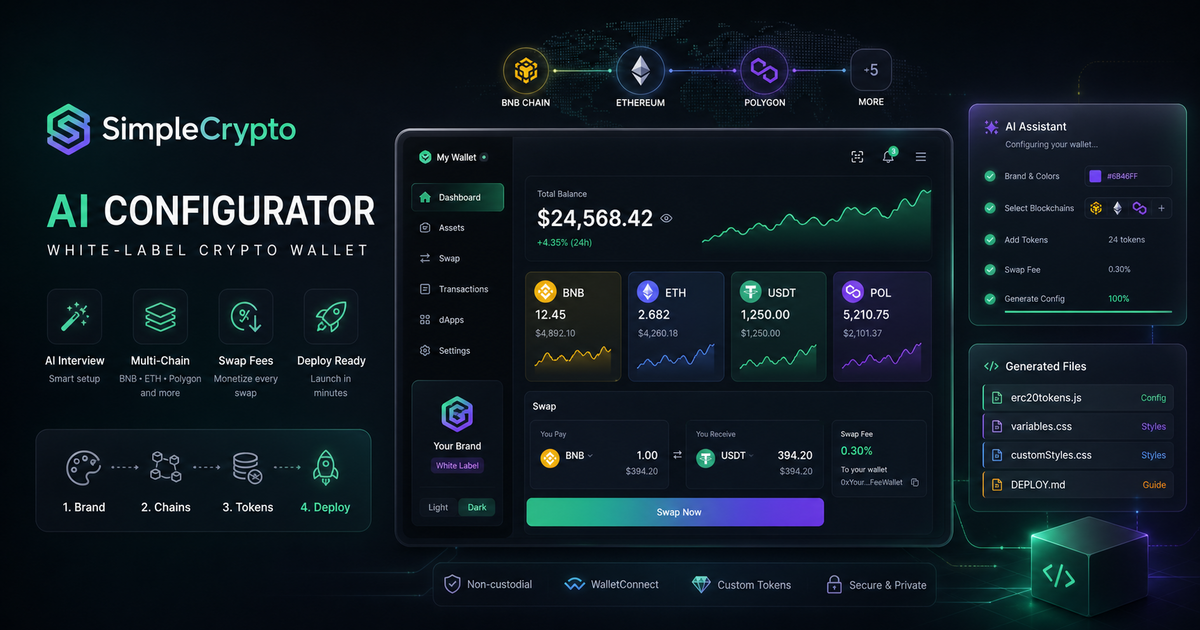 That experience is why I built SimpleCrypto's AI configurator. The interview takes 10 minutes. The generated files work on first deploy.
Here's what the configurator actually does — including real output examples.
Key facts
- Manual MCW configuration requires understanding 400+ lines of JSON-like JavaScript with sparse documentation — 4–8 hours for a developer
- SimpleCrypto's AI conducts a structured interview and generates production-ready config files
- The output is 4 files:
erc20tokens.js,variables.css,customStyles.css,DEPLOY.md - Supported networks out of the box: BNB Chain, Ethereum, Bitcoin, Polygon, Arbitrum, Avalanche, Gnosis
During rollout planning for simple crypto, the recurring issue was not feature quantity but whether a buyer could verify limits, exports, integrations, and ownership before committing.
What Is MultiCurrencyWallet?
MultiCurrencyWallet (MCW) is an open-source non-custodial crypto wallet built by the swaponline team. Unlike most wallets, MCW was designed from the ground up for white-label deployment: it ships as a static build (pre-compiled React app) that you configure via external files and host anywhere.
Key technical characteristics: - P2P atomic swaps: trustless BTC ↔ ETH exchange without a centralized order book - Multi-chain support: 6+ EVM and non-EVM networks in a single interface - WalletConnect: users can connect to Uniswap, PancakeSwap, and any dApp directly from the wallet - Non-custodial: keys generated and stored locally in the browser, never transmitted - Static deployment: no Node.js backend required — host on GitHub Pages, Cloudflare Pages, or any Nginx server
The configuration model is the key: MCW's behavior is entirely determined by the external config files. Change the files, change the wallet — no recompilation required.
The Four Files That Define Your Wallet
erc20tokens.js
This is the master configuration. It sets window.buildOptions — a global object MCW reads on startup.
What it controls:
- Which blockchains are active (ETH, BNB, BTC, MATIC, ARB, etc.)
- Which tokens appear in the wallet UI
- Fee address and percentage for swap monetization
- WalletConnect configuration
- UI feature flags (isSwapActive, isTokenSwap, isLiquidityEnabled)
- Custom token definitions (name, symbol, contract address, decimals)
Real example of a token entry generated by SimpleCrypto:
{
  standard: 'ERC20',
  address: '0xYourTokenAddress',
  decimals: 18,
  name: 'Your Token Name',
  ticker: 'YOUR',
  fullName: 'Your Token Full Name (ERC20)',
  icon: 'https://your-domain.com/token-icon.png',
  isCustomToken: false,
}
And fee configuration:
feeAddress: '0xYourFeeWalletAddress',
buyFee: '0.3',
sellFee: '0.3',
variables.css
CSS custom properties for all brand colors. MCW uses CSS variables throughout — changing them cascades to every UI element.
:root {
  --primary: #8B5CF6;
  --secondary: #6D28D9;
  --background: #FFFFFF;
  --surface: #F9FAFB;
  --text-primary: #111827;
  --text-secondary: #6B7280;
}

[data-theme="dark"] {
  --primary: #A78BFA;
  --background: #111827;
  --surface: #1F2937;
  --text-primary: #F9FAFB;
  --text-secondary: #9CA3AF;
}
SimpleCrypto generates both light and dark variants from your brand color input.
customStyles.css
Additional styles for logo placement, font overrides, header customization. This is the file for precise brand control beyond colors.
DEPLOY.md
Step-by-step deployment instructions tailored to your chosen hosting. SimpleCrypto generates different DEPLOY.md files for: - GitHub Pages (free, 15-minute setup) - VPS with Nginx (custom domain, full control) - Cloudflare Pages (free tier, CDN performance)
The instructions include exact commands for your specific setup — not generic documentation.
How the AI Interview Works
The AI at simplecrypto.wpmix.net conducts a structured interview covering 4 stages:
Stage 1 — Identity: wallet name, tagline, target audience
Stage 2 — Blockchains and tokens: which networks to enable, custom token contract addresses (BEP-20, ERC-20), whether to include Bitcoin (requires atomic swap setup)
Stage 3 — Monetization: fee wallet address, buy/sell fee percentage (0.1%–1.0% typical), which swap pairs apply
Stage 4 — Brand and deployment: primary color (hex), dark/light mode preference, hosting choice (GitHub Pages / VPS / Cloudflare)
Total time: 8–12 minutes depending on configuration complexity.
Why Manual MCW Setup Takes 4–8 Hours
The MCW configuration file (erc20tokens.js) has approximately 400+ configurable parameters when counting all token definitions, feature flags, and network settings. The documentation on GitHub is functional but terse — it describes what parameters exist but not always what happens when you combine them.
Common pitfalls I encountered manually:
- isSwapActive: true enables the swap tab but doesn't automatically enable atomic swap — that requires separate HTLC configuration
- Adding a custom BEP-20 token requires specifying standard: 'BEP20' not 'ERC20' even for ERC-20 equivalent tokens on BNB Chain
- variables.css must be in the root of the MCW build directory, not a subdirectory — easy to miss in the deployment
- GitHub Pages requires the repo to be public for the free tier and the gh-pages branch to be correctly set
The AI configurator encodes this domain knowledge and produces correct output on the first run.
What You Get After the Interview
Within 2–3 minutes of completing the interview, SimpleCrypto generates:
your-wallet-config/
├── erc20tokens.js        # 80–150 lines, production-ready
├── variables.css         # Light + dark brand colors
├── customStyles.css      # Logo, fonts, header
└── DEPLOY.md             # Step-by-step for your hosting
Copy these files to your MCW directory, follow the DEPLOY.md, and your white-label wallet is live.
Comparison: Manual vs AI-Assisted MCW Setup
| Step | Manual Setup | SimpleCrypto AI |
|---|---|---|
| Read MCW documentation | 2–3 hours | Not required |
| Write erc20tokens.js | 1–2 hours | Generated automatically |
| Configure CSS variables | 30 minutes | Generated from hex input |
| Set up deployment | 30–60 minutes | DEPLOY.md is generated and specific |
| Debug first deploy | 30–60 minutes | Typically works first time |
| Total time | 4–8 hours | 10 minutes interview + 20 min deploy |
Frequently Asked Questions
Do I need to understand React or JavaScript to use the configurator? No. The generated files are configuration data — you don't write or modify code. Deployment follows the DEPLOY.md line by line.
Can I edit the generated files after?
Yes — they're standard .js and .css files. If you want to make adjustments after the initial configuration, edit them directly or run a new configurator session.
What if I have a custom token with non-standard parameters? The AI handles BEP-20 and ERC-20 tokens with non-standard decimals or names. Provide the contract address during the interview — the AI fetches the token parameters or asks clarifying questions.
Is the MCW build included or do I need to set it up separately? SimpleCrypto generates the configuration files for an existing MCW build. The DEPLOY.md includes instructions for cloning the MCW repository. This is a one-time 5-minute step.
Can I run the AI configurator multiple times for different wallet variants? Yes. Each session is independent and generates a fresh config set. Useful for testing different fee structures or creating separate wallets for different brands.
Price — $50/mo. Message @onoutnoxon — we'll configure your MCW wallet and show a working demo.
Sources
- swaponline/MultiCurrencyWallet — GitHub
- MCW Documentation — Wiki
- WalletConnect v2 Documentation
- GitHub Pages — Deployment Guide
- Atomic swap (HTLC) technical specification — Bitcoin Wiki
About the service "MultiCurrencyWallet Configurator 2026: What the AI Configurator Actually Does (And What It Generates)"
MultiCurrencyWallet configurator with AI: how SimpleCrypto's AI interview generates erc20tokens.js, variables.css, and DEPLOY.md. Real config examples, 10-minute setup guide.