
Home Assistant Thermostat: How to Choose for Your Heating System
The children's room feels cool in the morning, while the living room is already warm. The family wants room-by-room temperature control and a clear view of the heating in Home Assistant. The first question is what heats each room: a radiator, a dedicated boiler, underfloor heating, or a building-wide system. A thermostat can control only equipment it can connect to correctly.
Using one room as an example, this guide explains what to check before buying and how to find out which functions remain available without internet access. It is not an installation guide or a test of a particular boiler. Check the exact equipment manuals and consult a heating professional where required.
Key facts
- The heating system determines what equipment can be controlled from Home Assistant.
- For an independent boiler, check the exact model documentation and its supported control interface.
- A local integration may avoid a cloud account, but its dependence on the home network, Home Assistant, coordinator, and power must be checked separately.
- The temperature sensor and actuator must suit the same room and the chosen scenario.
- A
climateentity in the interface does not prove that a command reached the boiler or radiator.
One room, one morning scenario
Imagine an apartment with a radiator in the children's room. The parents want a weekday schedule, a manual adjustment in the evening, and a way to see the current state in Home Assistant. Break the setup into four parts:
- Heat source: the radiator and the system that supplies heat to it.
- Actuator: a device that can change heat delivery to this room.
- Measurement: a sensor or thermostat that reports the temperature from a useful location.
- Control: Home Assistant, the manufacturer's app, or a physical control.
The diagram shows this way of thinking. It is not a wiring diagram or proof that any particular devices are compatible.
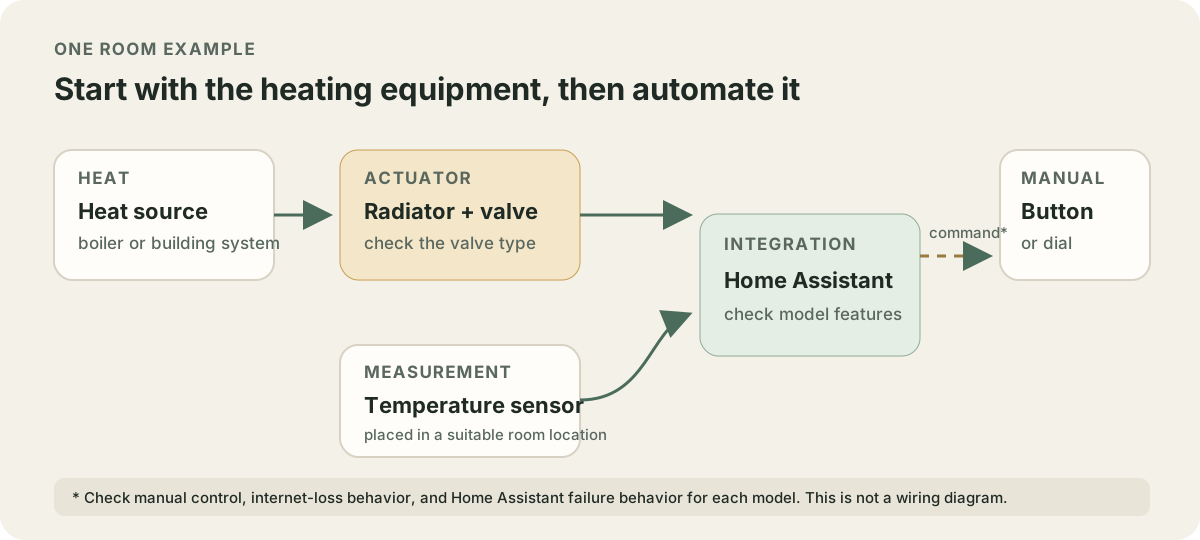
For a radiator with a compatible thermostatic valve, the actuator may be a thermostatic head that adjusts flow through that radiator. A boiler may instead use its own thermostat or controller with a documented interface. These are different control problems. Connecting a device to Home Assistant does not add a radiator valve or create a separate heating zone where none exists.
Identify the heating system first
| What the room has | What to find out before choosing | Possible Home Assistant role |
|---|---|---|
| Radiator with a thermostatic valve | Whether the actuator and adapter fit the exact valve, where the temperature is measured, and whether the heating system supports room-level control | Send a setpoint to a compatible device and show its state if the selected integration supports those functions |
| Radiator without an adjustable valve | Whether the manufacturer provides a place and method to regulate heat, and whether a separate room control is possible without altering the shared system | Home Assistant cannot replace a missing actuator or valve by itself |
| Boiler or independent heating system | Exact model, control inputs, existing thermostat, and manufacturer requirements; who will install it | Use a documented interface and supported integration. Check the signal type and permitted wiring for the exact model |
| Underfloor heating | System type, existing thermostat, actuators, individual zones, and manufacturer limits | Link controls only after checking the whole system and its manufacturer's requirements |
| Building-wide central heating | Which changes the building system permits and whether an individual radiator can be controlled physically | Home Assistant can control an existing compatible device, but it cannot change the building's heating design |
If one boiler serves several rooms, changing its setpoint may affect the entire home. Find out whether the system has separate zones and how its existing controls handle each one. Do not choose a relay or thermostat based only on a voltage or connector mentioned in someone else's wiring diagram.
What local control means
“Local” can mean that a command stays within the home network and does not require the manufacturer's account. It does not answer what happens if the router is off, Home Assistant stops, radio communication is lost, or a battery runs down.
Home Assistant represents climate equipment with climate entities, but Climate is a building-block integration. The available modes and commands depend on the integration for the actual device. For example, the Venstar integration uses the thermostat's local API without the Skyport cloud service. Local API must be enabled on the thermostat itself. This applies to the documented Venstar models, not to every thermostat.
For a Zigbee setup, check the complete chain: the radio device, coordinator, and Home Assistant integration. ZHA connects supported Zigbee devices through a coordinator. The Zigbee logo alone does not confirm that every device or feature is supported. The SONOFF TRVZB manual describes a physical dial and Auto and Manual modes, battery power, and the need to check the valve adapter. It does not claim that all Home Assistant functions remain available if the coordinator or Home Assistant is unavailable.
Write down which failure you want to check:
- Internet is down, but the home network and Home Assistant are running. Check whether the device responds through its local integration and whether the needed commands are still available.
- Home Assistant or the coordinator is unavailable. Check whether the device has physical controls and how the heating system's own controls behave without it.
- The device loses power or communication. Check its indicators and manufacturer's instructions. Do not assume it will keep a particular state if communication fails or the battery is low.
Follow the device manuals and use a normal, safe operating mode when checking these scenarios. Disconnecting internet does not test what happens when Home Assistant is unavailable. A test in one room does not confirm that heating works throughout the home.
Check the device against the system
For each candidate device, answer these questions:
- What does it physically control? A radiator valve, a boiler thermostat input, an underfloor heating zone, or temperature readings only?
- What can Home Assistant read or change? A target temperature, operating mode, schedule, heating state, or sensor readings only? This depends on the integration and device.
- How does it connect? Through a local network, Zigbee coordinator, Z-Wave, a cable, or a manufacturer's account? Check whether a separate bridge or server is required.
- How is it powered? Mains, batteries, or wiring? For a battery device, check the battery type and the low-battery warning in its manual.
- Does the mounting hardware fit? For a radiator head, check the thread, adapter list, and instructions for the exact valve. A matching thread does not prove that the device suits every heating system.
- Can the family still operate it manually? Find the physical buttons or existing thermostat. Check whether the heating system retains its own limits and schedule if Home Assistant loses connection.
The SONOFF TRVZB manual lists Zigbee, three AA batteries, an M30 × 1.5 thread, and a setpoint range of 4–35 °C. The manufacturer also says to check whether an adapter is needed. These are specifications for that model, not proof that it fits every valve or works with every Zigbee stack. Before buying, check the current valve compatibility guide and the feature list for the selected Home Assistant integration.
Home Assistant also has Generic Thermostat for a simple setup. It is a software thermostat that needs a temperature sensor and a switch controlling a heater. One Generic Thermostat entity controls one switch. It does not replace a hardware thermostat or make an arbitrary boiler compatible. Use it only where the equipment and control method have been confirmed as suitable.
Place the temperature sensor
A radiator thermostatic head's built-in sensor sits next to the radiator. Nearby heat, curtains, a recess, direct sunlight, or moving air can affect the reading in a particular room. If the head uses its built-in sensor for control, check whether the model supports an external sensor and whether it can use one in the room.
Place a separate room sensor where it can reflect the temperature in the area people normally use. Keep it away from local heat and cold sources. Compare its reading with a thermometer in the same place over a similar period. A sensor near a window, above a radiator, or on a cold exterior wall may cause an automation to react to conditions at that location.
For the children's room, start with that room alone. Observe whether the sensor reading changes while heating is on, how the actuator responds, and whether you can restore the usual setting manually. Do not set every room to the same target before confirming where its temperature is measured.
Check failure behavior and manual control
First save a Home Assistant configuration backup and note the heating system's usual settings. Then check one room:
- Does a setpoint change on the device, in Home Assistant, and in the manufacturer's app?
- Does the displayed state agree with the thermostat or actuator?
- Can you change the setpoint on the device and return to its usual mode manually?
- Which functions remain available without internet when the home network is running?
- How does Home Assistant show that the device is unavailable, and how does the heating behave without it?
Do not test a failure by turning off the boiler or blocking heating unless the manufacturer describes that as a normal test. If an integration requires wiring to boiler contacts, follow the documentation for the exact model and manufacturer rules; confirm in advance whether a qualified professional is needed.
Pre-purchase checklist
- [ ] The heating type and exact boiler, thermostat, valve, or controller model are recorded.
- [ ] It is clear which room and device the system can control independently.
- [ ] The manufacturer confirms the mounting interface and any required adapters.
- [ ] The current Home Assistant documentation lists an integration for the exact model and the functions it supports.
- [ ] Dependencies on cloud access, the home network, a coordinator, and power are understood.
- [ ] You know how to operate the system manually and what happens when Home Assistant is unavailable.
- [ ] The scenario is checked with one device before buying multiple actuators.
Talk through your heating plan
Need help checking one room before buying? Send the heating type and thermostat or valve model in the onout.org Telegram chat. We can first prepare a checklist of compatibility and offline-behavior details to confirm. Installation or configuration can be scoped separately afterward.
Frequently asked questions
Will the heating still work without internet?
That depends on the thermostat and heating system. Home Assistant documents a local API for some Venstar models, while the SONOFF manual describes a manual mode for TRVZB. For another device, check the exact model and separately verify loss of internet, Home Assistant, and radio communication under normal conditions.
Can I control a boiler with a Zigbee relay?
You cannot conclude that from the relay's Home Assistant connection alone. Check the boiler requirements, its control circuit, and the relay documentation first. Compatibility and installation depend on the exact models; do not copy someone else's wiring diagram.
Will TRVZB fit my radiator?
Check the valve type and SONOFF adapter list. The TRVZB manual lists an M30 × 1.5 thread and says to check whether an adapter is required. Those details do not confirm that it fits every valve.
Should I choose a climate entity or Generic Thermostat?
climate is a Home Assistant entity type provided by a device integration. Generic Thermostat is a software thermostat that needs a temperature sensor and a controllable switch. It is suitable only when a heater can be controlled appropriately; it does not replace a boiler's own control system.
How can I tell if an automation really works?
In one room, check the setpoint change, sensor reading, actuator response, manual control, and behavior when Home Assistant is unavailable. A command appearing in the interface alone does not confirm that the heating equipment changed state physically.
Sources
- Climate: Home Assistant entities and modes
- Generic Thermostat: sensor, switch, and limitations
- Venstar: local API and supported models
- ZHA: connecting Zigbee devices through a coordinator
- SONOFF TRVZB: manual and specifications
This article was drafted with AI assistance and checked against Home Assistant and SONOFF documentation as of 26 October 2026. We did not install heating equipment or test the specific models while preparing it.
About the service "Home Assistant Thermostat: How to Choose for Your Heating System"
Choose a Home Assistant thermostat for a radiator, boiler, or underfloor heating. Check local control, room sensors, manual operation, and compatibility.