
AI Paid Search Automation with MCP: A Workflow for Regional Accounts
Paid search platforms are built for specialists, but campaign operations often involve managers, product teams, regional owners and finance approvers. The result is predictable: launch briefs live in chats, keywords live in spreadsheets, platform changes happen manually, and no one has a clean audit trail.
Highlights
- This page answers one concrete intent: AI paid search automation.
- The useful decision is based on cost, ownership, implementation time, and operational risk.
- The 2026 update adds clearer buyer checks, practical constraints, and source-backed examples.
- Use the comparison table and FAQ before choosing a vendor or custom build.
What we checked for this article: whether "AI Paid Search Automation with MCP: A Workflow for Regional Accounts 2026" answers a real buyer question with practical constraints, risks, and next steps.
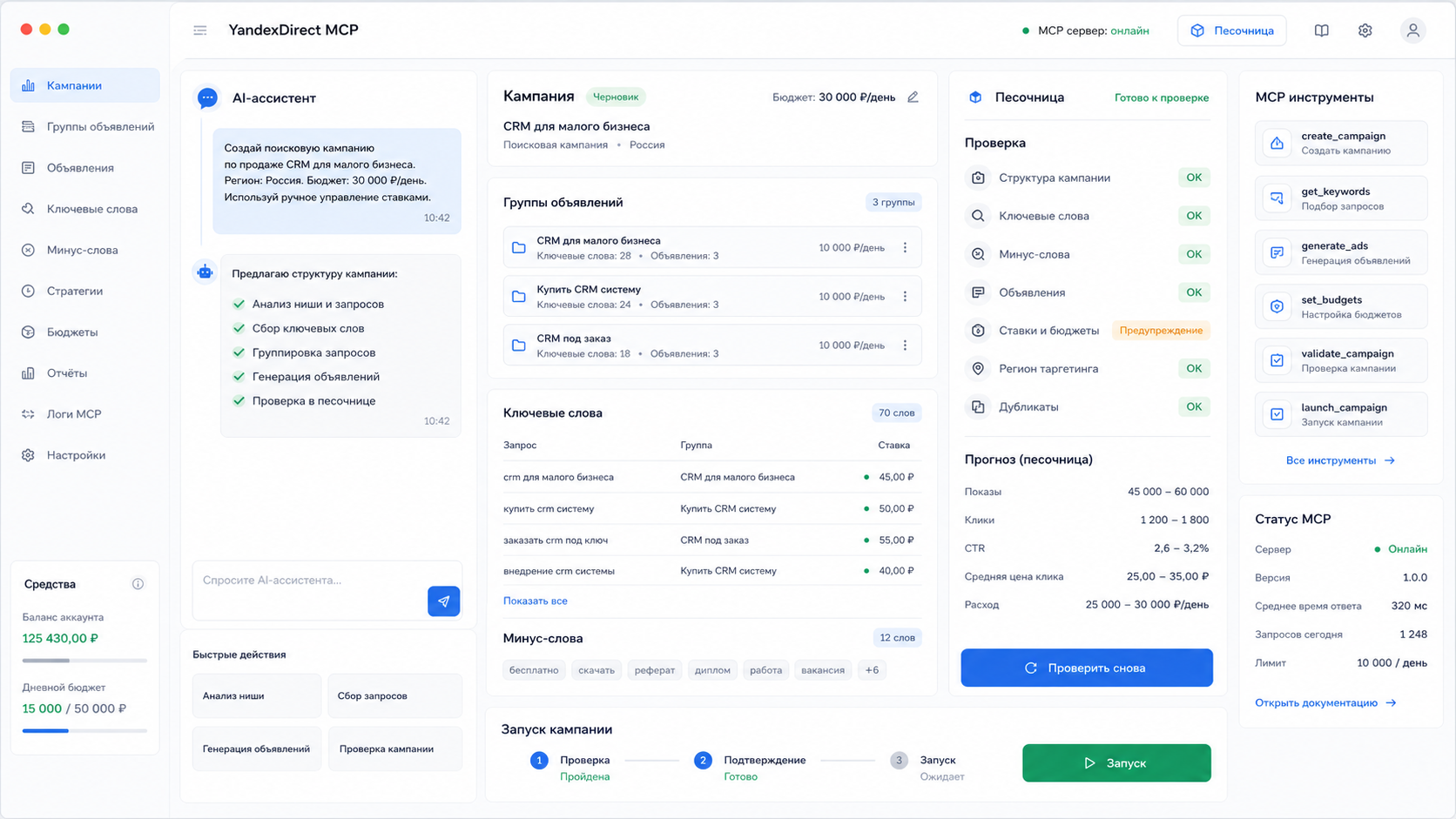
An MCP server can turn an AI assistant into a controlled workflow layer for paid search. The assistant handles the conversation and asks clarifying questions. The MCP server validates inputs, prepares API payloads, runs dry checks, requests approval and logs the result.
This is not a local-only keyword article. The same architecture can support teams managing regional ad accounts, localized campaigns and repeated launch patterns.
What MCP Adds to Paid Search Work
Model Context Protocol gives an AI assistant access to specific tools rather than unrestricted system access. For paid search, those tools can include:
| Tool | Purpose |
|---|---|
draftCampaign |
Prepare campaign settings from a launch brief |
draftAdGroups |
Create grouped structure by region, product, intent or funnel stage |
validateKeywords |
Check match types, duplicates, exclusions and naming rules |
checkTrackingUrls |
Verify landing pages and tracking parameters before launch |
prepareBudgetChange |
Draft budget moves with threshold and approval logic |
summarizeAccount |
Report spend, conversions, anomalies and next actions |
publishApprovedChange |
Send only reviewed changes to the platform API |
The important part is not the tool names. The important part is the control boundary: AI can prepare and explain, while the server validates and executes according to rules.
Regional Account Workflow
A realistic workflow looks like this:
- A regional manager submits a campaign brief with market, product, language, budget and landing page.
- The assistant asks for missing fields and confirms the conversion goal.
- The MCP server generates a campaign draft using approved naming and tracking rules.
- The server checks platform limits, account permissions, duplicate keywords and URL status.
- The result is shown as a dry-run summary with risks and missing approvals.
- A human approves changes above the configured threshold.
- The server publishes the approved changes and writes an audit entry.
This reduces manual work while preserving accountability.
Where AI Helps and Where It Should Not Decide Alone
AI is useful for:
- Turning messy launch briefs into structured campaign drafts.
- Suggesting ad group segmentation and keyword themes.
- Summarizing account anomalies in plain language.
- Drafting explanations for stakeholders.
- Finding missing tracking, duplicate terms or inconsistent naming.
AI should not independently:
- Increase budgets without thresholds.
- Launch campaigns in production without approval.
- Override compliance rules for regulated categories.
- Change conversion tracking logic without technical review.
- Treat one region's keyword assumptions as universal.
Implementation Requirements
A production-ready MCP workflow needs:
- Typed input schemas and validation.
- Sandbox, dry-run or read-only modes for testing.
- Role-based access for account readers, editors and publishers.
- Audit logs with request, user, payload, platform response and timestamp.
- Retry handling for platform API limits.
- Configuration per market, language, currency and approval owner.
- Monitoring for failed jobs and unusual account changes.
Without these controls, "AI automation" becomes another manual cleanup problem.
Frequently Asked Questions
Is this only for one advertising platform?
No. The MCP pattern is platform-neutral. Each ad platform needs its own connector and rule mapping, but the operating model is the same: draft, validate, approve, publish and log.
Can AI write all ad copy?
AI can draft variations and localize messaging, but brand, legal and platform-policy review should stay in the workflow. This is especially important for regulated sectors.
What is the safest first workflow to automate?
Start with dry-run campaign drafting or regional reporting. Both produce immediate time savings and avoid direct spend changes while the team validates the process.
How does this differ from scripts?
Scripts execute predefined logic. An MCP server adds a conversational planning layer, tool permissions, typed inputs and human approval checkpoints around the execution.
Sources
- Model Context Protocol documentation
- Google Ads API: best practices
- Microsoft Advertising API documentation
- Google Search Central: creating helpful, reliable, people-first content
We build MCP workflow servers for paid search, analytics and internal marketing operations. Focused MVPs can start from 300 USDT when the first workflow is clearly scoped.
Message @onoutnoxon to discuss your regional account structure, approval model and first automation workflow.
Learn more on the product page: Paid Search MCP Server.
The article "AI Paid Search Automation with MCP: A Workflow for Regional Accounts 2026" is AI-assisted and reviewed by Alexander Ruin, founder of onout.org. Updated: 2026-05-01.
About the service "AI Paid Search Automation with MCP: A Workflow for Regional Accounts 2026"
How an MCP server helps paid search teams manage regional ad accounts with AI-assisted campaign drafts, validation, approval gates and audit logs.