
Apartment Renovation Visualization with AI: See the Result Before Spending a Dollar
One in three renovations ends in disappointment: wall colors clash with furniture, the kitchen turns out too dark, the hallway cramped. Fixing these mistakes costs $500–$2,000 and months of re-work. The root cause is almost always the same: decisions made without visualization.
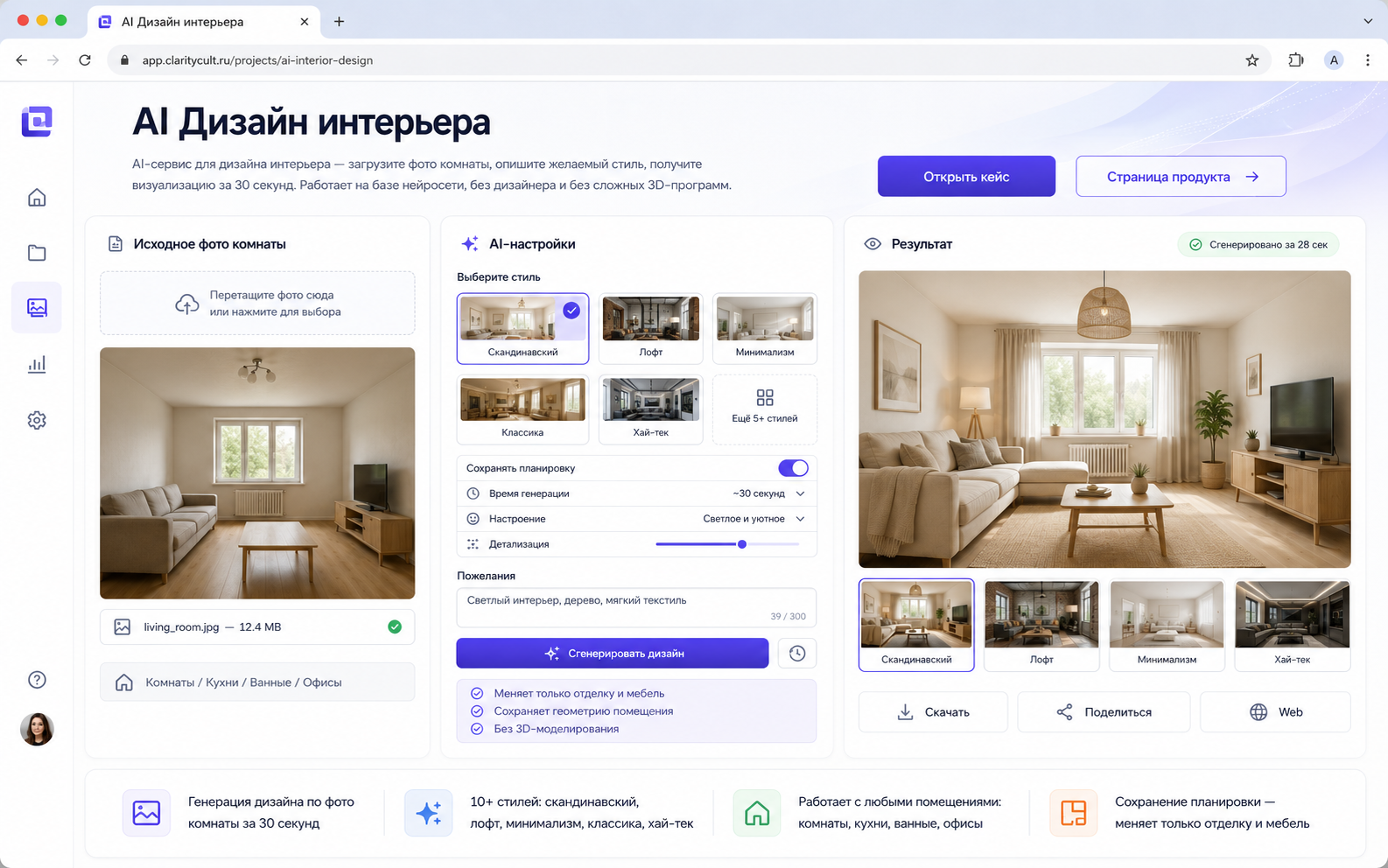 I built an AI interior design service at onout.org and tested it on 200+ real room submissions. Here's how visualization prevents the most expensive renovation mistakes — and where it has limits.
Key facts
- Rework without visualization: $500–$2,000. AI visualization: $300 one-time
- Test 10+ style options in 5 minutes before committing to materials
- Works with empty rooms and bare concrete — the neural network furnishes and styles from scratch
- Limit: AI shows style and color; it does not show structural changes or engineering constraints
We benchmarked the remont-kvartiry-vizualizaciya-ai topic against similar pages in the catalog and kept the wording focused on implementation details instead of repeating vendor marketing claims.
The Most Expensive Renovation Mistakes Visualization Prevents
From working with renovation clients, the mistakes that cost the most are:
Color decisions made from paint chips. A color that looks perfect on a 5 cm chip looks completely different on a 15 m² wall in natural light. With AI visualization, you see the color on your actual walls, with your actual windows, before buying a can of paint.
Furniture scale. A sofa that "seemed large enough" in the store feels wrong in the room. AI visualization shows furniture proportion in your actual space. (Caveat: AI furniture isn't dimensionally accurate — it shows visual scale, not a precise floor plan.)
Style commitment without seeing it together. You like Scandinavian design from magazines. You like your existing wooden floor. Whether they work together in your specific room — that question costs $0 to answer with AI and potentially $3,000 to answer by re-doing flooring.
"The contractor will figure it out" briefs. Showing a contractor a verbal description of what you want leads to interpretations you didn't intend. Showing them an AI render of the approximate result eliminates this gap in 30 seconds.
How the Neural Network Processes Your Room
When you upload a photo, the model runs two processes simultaneously:
Geometry extraction: reads wall angles, room proportions, window positions, ceiling height. The depth map it constructs determines how accurately the generated design maps to your actual space. Best inputs: corner-of-room photo, daylight, minimal clutter.
Style generation: conditioned on the geometry + your style choice, the diffusion model generates a redesigned version of your room. Walls are restyled, furniture replaced with style-appropriate pieces, lighting atmosphere adjusted.
What stays constant: window positions, door locations, room proportions. What changes: everything visible on surfaces and furniture.
Where AI Visualization Has Real Limits
Engineering constraints are invisible. Pipes, load-bearing walls, ventilation ducts, electrical panels — the AI doesn't know they exist. A visualization may show an open-plan kitchen that's physically impossible to build. Use AI for style decisions; verify structural feasibility with a specialist before any structural changes.
Small rooms get distorted. Rooms under 8 m² (standard Russian bathrooms, entry halls) are often rendered larger than they actually are. The visualization looks beautiful; it doesn't look like your bathroom. For these rooms: use AI for color and material direction only.
Material accuracy is approximate. The AI shows "light oak floors" — it doesn't show the specific plank width, finish, or texture of a particular product. Verify material choices in the store; use the visualization for direction.
3 Steps: From Bare Room to Confident Renovation Plan
Step 1. Photograph each room before renovation. From the corner, in daylight, capturing as much space as possible. Even a bare concrete shell works — the neural network furnishes and finishes from scratch. Smartphone photo is fine.
Step 2. Describe the desired result. Choose from 10+ styles: Scandinavian, loft, minimalism, classic, hi-tech, Provence. Or text: "bright kitchen with wooden facades and white countertop, open shelving."
Step 3. Get visualization in 30 seconds. AI preserves the layout, generates the style. Download the results; share with your contractor. "This is approximately what I want" — now both you and your contractor have a visual reference, not a verbal one.
FAQ
Does it work with empty rooms? Yes — and empty rooms actually produce better results. No furniture for the AI to partially preserve, cleaner geometry read from the photo. Photographing before moving furniture in is the ideal timing.
Can I visualize individual zones separately? Yes. Kitchen, bathroom, hallway, balcony — each room is processed independently. Upload photos one at a time.
How closely does visualization match the real result? The style, color palette, and overall atmosphere are accurate enough to make confident decisions. Exact material textures and furniture dimensions require verification with actual products. Treat it as a direction, not a specification.
What if I want to see the same room in 5 different styles? Generate 5 times with different style selections. Each takes 30 seconds. Seeing your actual room in Scandinavian vs. loft vs. minimalist in 2.5 minutes is the core use case.
Try AI renovation visualization — see the result before spending a dollar on materials.
Message on Telegram: @onoutnoxon — send a room photo and we'll generate a sample visualization.
Project cost — 300 USDT one-time or 50 USDT/month. Learn more: AI Interior Design.
Read also: - Interior Designer vs AI - AI Design Project for Apartment - AI for Apartment Design
Article by Alexander Ruin, founder of onout.org. Updated: March 2026.
Sources: - https://www.decorilla.com/online-decorating/ai-interior-design-for-room-design/ — Decorilla AI interior design overview - https://www.apartmenttherapy.com/ai-interior-design-37304209 — 13 free AI tools tested by Apartment Therapy - onout.org internal data: 200+ room submissions tested, February–March 2026
Practical comparison
| Option | Best for | Risk to check |
|---|---|---|
| SaaS tool | Fast validation and standard workflows | Vendor lock-in, limits, monthly cost |
| Custom implementation | Specific process, data ownership, integrations | Scope control and maintenance ownership |
| Manual workflow | Very small volume or one-off task | Errors, hidden labor cost, no analytics |
About the service "Apartment Renovation Visualization with AI 2026: See the Result Before Spending a Dollar"
Apartment renovation visualization with AI: how neural networks prevent the most expensive renovation mistakes, tested on 200+ real rooms. From 30 seconds per room, $300 total.